
This blog covers work done as part of two projects at UiA Motion Lab:
1) Developing a New Simulator of UiA Motion Lab Using NVIDIA Isaac Sim.
2) Integrating UiA Motion Lab’s Control System with NVIDIA Isaac Sim.
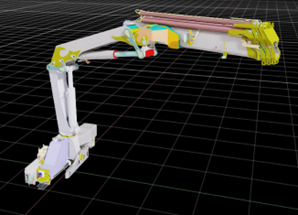
As part of UiA Motion Lab, I got to work on a project where NVIDIA Isaac Sim was used to bring a real truck crane into a virtual world. The idea was to create a visualisation of the crane’s movements in Isaac Sim, based on data sent over ADS (Automation Device Specification), Beckhoff’s communication protocol for exchanging data with a TwinCAT runtime.
The crane is controlled by a PLC running TwinCAT, and all the important joint angles are available through ADS. I connected these signals to Isaac Sim via Python’s ADS library, so that every movement of the physical crane could be mirrored by a digital version on screen.
A big part of the work was simply getting to know Isaac Sim, how to build and set up a crane model, and how to properly represent the joints of the crane. There was a lot of trial and error regarding the build and setup of the model. I ended up using a program called Onshape to set up the crane model and then imported it from there to Isaac Sim. Onshape gave me the ability to transfer the preexisting CAD model of the crane to Isaac Sim even with the correct joint types. When the crane was imported there were just some simple steps that had to be done in Isaac Sim. I had to choose what joints to control and implement my code to transfer the reading from ADS to those joints.
In the end, I got a working visualisation where you can see the crane move in Isaac Sim based on ADS readings. For me, the project was a great mix of programming, model building and learning new programs. I learned a lot about Isaac Sim, data communication with ADS, and problem solving.